



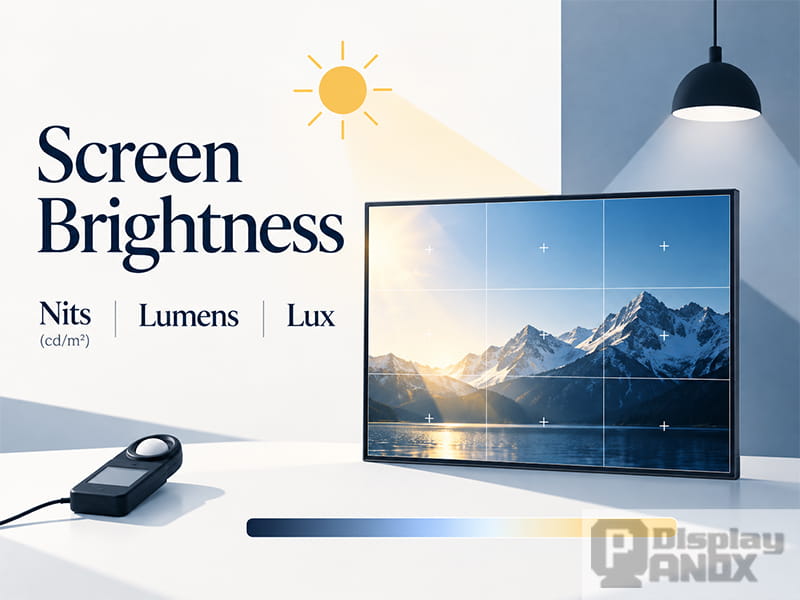
A display specification may state that an LCD panel has a brightness of 350 nits. But what does that number actually mean? Is it the same as 350 cd/m², and how does it compare with lumens or lux?
These questions frequently arise during LCD module selection, product development, and mass production. Brightness is one of the most important display specifications, but the units used to describe light are not interchangeable. A panel rated at 350 nits may perform well in an office while becoming difficult to read outdoors. Meanwhile, a higher brightness rating does not automatically guarantee better display performance.
Understanding screen luminance, measurement methods, brightness uniformity, and dimming behavior helps engineers select displays that match their actual operating conditions.
For outdoor and industrial applications that demand excellent visibility, explore Panox Display's high luminance solutions, designed to deliver clear and reliable performance in bright lighting conditions.
1. What Is a Nit? Understanding Nits and cd/m²
A nit is a unit of luminance used to describe the brightness of a display surface. It is equivalent to one candela per square meter (cd/m²).
1 nit = 1 cd/m²
Therefore, a display rated at 350 nits has a luminance of 350 cd/m². Both values describe exactly the same physical quantity, and the two units can be used interchangeably when discussing LCD, OLED, and other electronic displays.
The term candela (cd) refers to luminous intensity in a particular direction. When expressed per square meter of projected surface area, it becomes luminance. In display measurements, luminance describes how much visible light is emitted from or transmitted through the screen in a specified viewing direction.
This directional characteristic is important. A display may appear bright when viewed directly from the front but become dimmer when viewed from an angle, depending on its optical structure and viewing-angle characteristics.
For a conventional TFT LCD, light originates from an LED backlight. It passes through optical films, the liquid crystal layer, color filters, and polarizers before exiting the front of the panel. The measured screen luminance represents the light that reaches the viewer after passing through these components.
OLED displays operate differently because their pixels emit light directly. However, their luminance is measured using the same unit, cd/m².
When an LCD datasheet specifies 350 cd/m², the value generally refers to the luminance measured under defined test conditions, often at the center of the screen, with the display showing a full-white image and the measurement instrument positioned perpendicular to the panel.
The exact test conditions should always be checked, especially when comparing displays from different manufacturers.
2. Nits vs Lumens vs Lux: What Is the Difference?
Nits, lumens, and lux all describe visible light, but they measure different properties. Understanding their differences prevents confusion when evaluating a display module or comparing it with another light-emitting device.
Nits (cd/m²): Luminance
Nits measure the luminance of a surface in a particular direction. This is the standard specification for electronic screen brightness.
For example, a 700-nit TFT LCD has a nominal luminance of 700 cd/m² under its specified measurement conditions. This measurement helps describe how bright the screen appears when viewed from the measurement direction.
Lumens (lm): Luminous Flux
Lumens measure the total amount of visible light emitted by a source, weighted according to human visual sensitivity.
This unit is commonly used for lighting products and projectors. A projector rated at 3,000 lumens describes its luminous flux rather than the luminance of the image displayed on a screen.
A 350-nit LCD cannot be directly converted into a lumen value without additional information about the display area and how light is distributed across viewing directions.
Lux (lx): Illuminance
Lux measures how much luminous flux falls onto a surface per unit area.
1 lux = 1 lumen/m²
Illuminance is commonly used to describe environmental lighting conditions, such as office lighting, indoor illumination, or outdoor daylight.
For example, an LCD may be installed in an environment with an illuminance of 10,000 lux while the display itself produces 700 nits of luminance. These values measure different things and should not be directly compared.
The distinction becomes particularly important for sunlight-readable displays. Lux describes the ambient light reaching the screen, while nits describe the screen's own luminance. Ambient light can also be reflected toward the viewer, reducing visible contrast.
A display's outdoor readability therefore depends on both its luminance and the amount of reflected light from its surface.
3. How Is LCD Screen Brightness Measured?
In display manufacturing, brightness is measured using dedicated optical instruments rather than estimated by visual inspection.
Common measurement equipment includes luminance meters, display color analyzers, and spectroradiometers. Instruments such as the Konica Minolta CA-310 Display Color Analyzer and CS-2000 Spectroradiometer can measure screen luminance and color characteristics with high precision.
The CA-310 has been widely used for production-line display measurements, while the CS-2000 is suitable for more detailed optical characterization, including spectral measurements.
For a typical TFT LCD brightness test, the panel is driven with a full-white image, usually corresponding to RGB values of 255, 255, 255 in an 8-bit system. The measurement instrument is aligned perpendicular to the display surface, and luminance is recorded after the panel has reached a stable operating condition.
Several factors must be controlled during measurement, including ambient lighting, backlight current, operating temperature, warm-up time, and viewing angle.
For example, an LCD specified at 350 cd/m² may have been measured at a particular LED driving current and an ambient temperature of approximately 25°C. Changing the backlight current or allowing the panel to heat up can affect the measured result.
The measurement position also matters. A single center-point reading provides useful information about nominal brightness, but it cannot describe luminance variation across the entire display.
This is why production testing often uses nine-point or thirteen-point measurement methods.
Nine-Point and Thirteen-Point Brightness Testing
In a nine-point measurement, the active display area is divided into a grid, and luminance is recorded at nine specified positions.
A thirteen-point method provides additional measurement locations for a more detailed assessment of screen brightness distribution.
The exact positions depend on the applicable testing specification. Measurement procedures may follow established display metrology methods, such as those described in the Information Display Measurements Standard (IDMS), or the manufacturer's own approved inspection procedure.
Multi-point testing is especially important for larger LCD modules, high-brightness industrial screens, and displays requiring consistent image quality across the entire active area.
For more details about measurement equipment and testing procedures, see Panox Display's guide on How to Test the Brightness of an LCD Display.
4. Why LCD Brightness Uniformity Matters
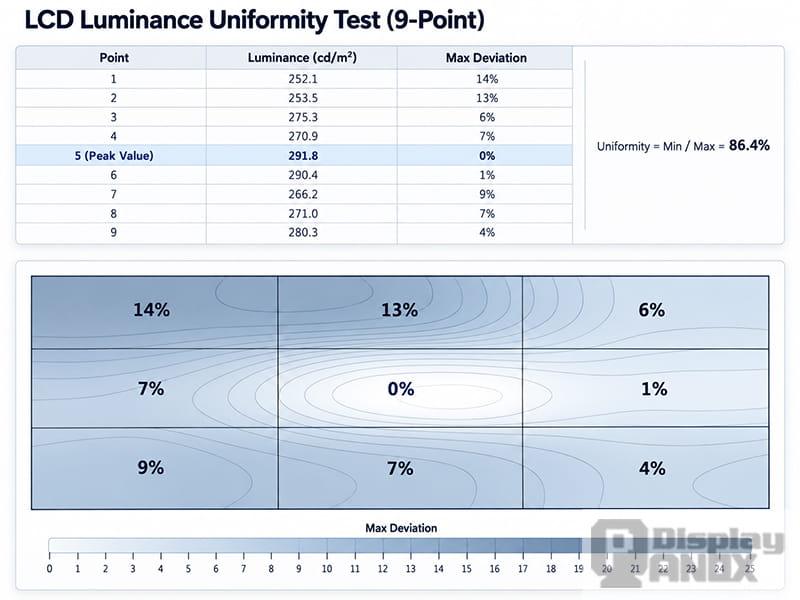
Two LCD panels may both be rated at 350 nits while showing noticeably different visual performance.
One panel may maintain relatively consistent luminance across its entire surface. Another may produce a bright center with darker edges or corners.
These differences are described by brightness uniformity, also called luminance uniformity.
In many edge-lit LCD designs, the center of the screen can appear brighter than the surrounding areas because of variations in the backlight system and optical film structure. However, the actual brightness distribution depends on the module design.
Poor uniformity becomes particularly noticeable when the display shows solid colors, white backgrounds, or grayscale test images. Dark corners, uneven illumination, and visible brightness patches can reduce perceived image quality even when the center luminance meets its specification.
One commonly used method calculates brightness uniformity as follows:
Brightness Uniformity (%) = (Minimum Luminance / Maximum Luminance) × 100%
The minimum and maximum values are taken from the specified measurement points.
For some LCD modules, a uniformity target of 80% or higher is used during quality control. However, this is not a universal acceptance requirement. The actual limit varies according to panel size, backlight structure, application, and customer specifications.
Different manufacturers may also use different uniformity calculations, so the measurement formula must be confirmed before comparing results.
During mass production, brightness uniformity should be evaluated alongside center luminance. A display that passes its nominal brightness requirement may still require further inspection if the edges appear excessively dark or the grayscale image reveals uneven illumination.
5. How Many Nits Does a Display Need?
The required screen brightness depends heavily on the application and the surrounding lighting environment.
A display used in an indoor office, a vehicle dashboard, or an outdoor navigation system may require very different luminance levels, even if the panels have similar dimensions and resolutions.
300–400 Nits: Indoor Displays
For many indoor applications, 300 to 400 nits can provide sufficient screen brightness.
This range is suitable for numerous LCD modules used in tablets, indoor control panels, portable devices, and consumer electronics operating under moderate ambient lighting.
A 350-nit LCD, for example, can provide clear images and readable text in an office or indoor environment without requiring an unusually powerful backlight.
Modern smartphones and premium tablets may offer considerably higher brightness, particularly when operating outdoors or displaying HDR content. However, their peak brightness capabilities should not be confused with the sustained full-screen luminance specified for a conventional industrial LCD.
700–1000 Nits: Bright Indoor and Semi-Outdoor Applications
Displays used in vehicle center consoles, industrial equipment, outdoor navigation devices, and bright indoor environments often benefit from higher luminance.
A range of approximately 700 to 1000 nits is a practical starting point for many of these applications.
For example, Panox Display offers a 4.3-inch 800×480 TFT LCD with 700 cd/m² luminance, suitable for industrial equipment, navigation systems, and embedded display applications.
Higher brightness helps maintain readability when ambient light increases or when the screen is viewed through protective cover glass.
However, a 700-nit display is not guaranteed to remain readable in direct sunlight. Surface reflection and the overall optical structure can significantly affect the final result.
1000 Nits and Above: High-Brightness Outdoor Displays
Outdoor displays exposed to strong daylight may require 1000 nits, 1500 nits, or even higher luminance, depending on the installation environment and optical design.
For instance, Panox Display's 12.1-inch high-brightness industrial TFT LCD provides a typical luminance of 1000 cd/m² and is designed for industrial and public equipment applications.
Typical use cases include outdoor control terminals, ticket machines, parking systems, and self-service kiosks.
Under direct sunlight, increasing luminance alone may still be insufficient. Strong ambient light is reflected by the cover glass and other optical interfaces, raising the apparent black level and reducing image contrast.
For this reason, sunlight-readable LCD designs often combine high-brightness backlights with anti-reflective coatings, anti-glare surface treatments, and optical bonding.
Another approach is to use a reflective or transflective LCD structure. A transflective display uses a partially reflective optical layer to take advantage of ambient light while retaining a backlight for darker environments.
This approach can improve daylight readability without relying entirely on increased backlight power.
More information is available in What Are Transflective Displays and How Do They Work?.
6. Does Higher Screen Brightness Increase Power Consumption and Heat?
Increasing screen brightness generally requires more electrical power, particularly for LCD modules that use LED backlights.
When the LED driving current increases, the backlight produces more light. At the same time, electrical power consumption and heat generation typically increase.
The relationship is not always linear because LED efficiency, temperature, and driver circuit characteristics also affect performance.
This creates an important engineering trade-off.
A high-brightness LCD may provide excellent visibility outdoors but place greater demands on the power supply and thermal design. In battery-powered devices, sustained operation at maximum brightness can significantly reduce operating time.
Heat is another concern.
An outdoor LCD operating under direct sunlight receives heat from both its internal electronics and the surrounding environment. Solar radiation can raise the temperature of the display surface and enclosure, while the LED backlight adds its own thermal load.
The combined effect can make the display module or front cover unusually hot during operation.
Excessive temperature may affect backlight efficiency, liquid crystal performance, optical materials, and long-term reliability.
For this reason, high-brightness display development requires more than simply increasing the LED current. The backlight design, driving circuit, heat dissipation structure, and operating temperature range must be considered together.
Automatic brightness adjustment can also help reduce unnecessary power consumption. By using an ambient light sensor, the system can increase luminance in bright environments and reduce it when the surroundings become darker.
This is particularly useful for automotive displays, outdoor handheld equipment, and battery-powered devices that operate under changing lighting conditions.
7. PWM vs DC Dimming: What Happens at Low Screen Brightness?
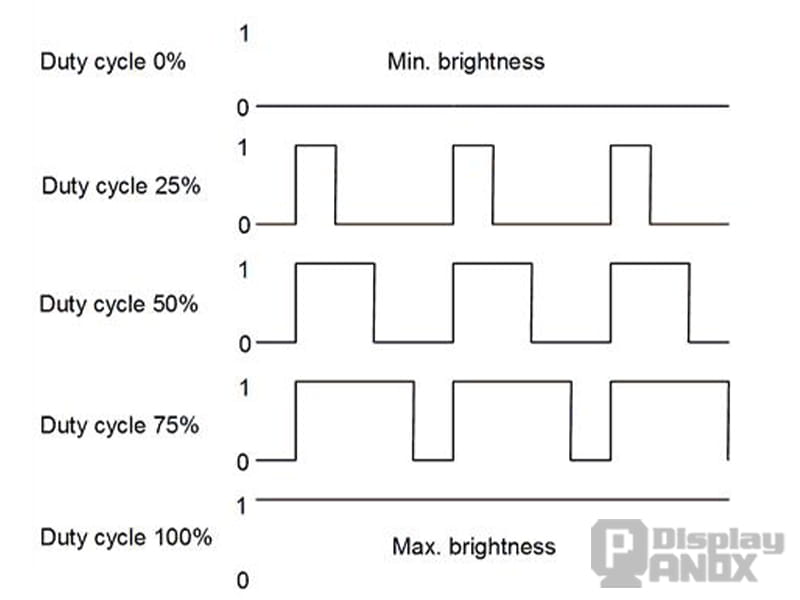
Maximum luminance is only one part of screen brightness performance. The way a display operates at low brightness is equally important, especially for devices used at night or over long periods.
LCD and OLED displays commonly use two brightness control approaches: DC dimming and pulse width modulation (PWM).
DC Dimming
DC dimming adjusts light output by changing the electrical current supplied to the light source.
In an LCD backlight system, reducing the LED driving current generally reduces the amount of light emitted.
This approach can provide relatively smooth brightness control without the repeated on-off switching associated with conventional PWM dimming.
However, adjusting LED current can also influence efficiency and color characteristics. The practical dimming range depends on the LED and driver design.
For OLED displays, very low driving currents may create additional challenges related to color accuracy and low-grayscale performance.
PWM Dimming
PWM controls perceived brightness by rapidly switching the light source between on and off states.
Instead of continuously reducing the light output, the system changes the proportion of time that the light remains on during each switching cycle. This proportion is known as the duty cycle.
A higher duty cycle produces greater average light output, while a lower duty cycle reduces perceived brightness.
PWM dimming is widely used because it allows precise brightness adjustment and can maintain relatively consistent operating conditions for the light source during its on-state.
However, PWM introduces temporal light modulation, commonly referred to as screen flicker.
Can PWM Dimming Cause Eye Strain?
At relatively low PWM frequencies, the repeated changes in light output may become noticeable to some users.
Frequencies below approximately 200 Hz are often discussed in relation to screen flicker sensitivity. Some people may perceive flicker directly or experience discomfort during prolonged viewing.
However, 200 Hz is not a universal boundary between safe and unsafe dimming.
The visual impact of PWM depends on several factors, including modulation frequency, modulation depth, duty cycle, screen brightness, viewing conditions, and individual sensitivity.
A higher PWM frequency generally reduces the visibility of flicker, which is why many modern smartphones promote high-frequency PWM dimming.
Nevertheless, frequency alone does not describe the complete behavior of a display. Two panels operating at the same PWM frequency may have different modulation depths and produce different viewing experiences.
High-frequency PWM also requires suitable driver circuitry and careful control of brightness transitions.
At very low brightness levels, maintaining consistent grayscale reproduction and luminance uniformity can become challenging, particularly in OLED panels where small variations in pixel driving behavior are more noticeable.
These challenges depend on the complete panel and driver design rather than PWM frequency alone.
For display development, low-brightness performance should therefore be evaluated together with maximum luminance. Important characteristics include the minimum achievable brightness, dimming stability, temporal light modulation, grayscale uniformity, and color consistency.
8. Choosing the Right LCD Brightness for a Display Project
Brightness selection should begin with the actual operating environment rather than the highest available nit rating.
A 350-nit LCD may be sufficient for indoor equipment, while a 700-nit panel can be more suitable for industrial controls or vehicle navigation systems. Outdoor equipment operating under strong daylight may require 1000 nits or higher, along with appropriate reflection control.
These ranges provide useful starting points, but they cannot replace application-specific testing.
For an industrial LCD project, engineers should consider both the required center luminance and the brightness distribution across the active area. A module that reaches its target brightness but has poor uniformity may still produce an unsatisfactory visual result.
The optical structure also matters. Protective cover glass, touch panels, polarizers, and bonding materials can affect the luminance and contrast ultimately seen by the user.
In outdoor products, controlling reflection may improve readability more effectively than continually increasing backlight power.
Power consumption and thermal behavior should also be evaluated early in development. A high-brightness display must maintain acceptable performance throughout the expected operating temperature range, particularly when installed in a sealed enclosure.
Finally, the dimming range should match the application's day and night requirements. An automotive display, for example, must remain readable under strong daylight while also supporting comfortable low-brightness operation in a dark cabin.
Panox Display provides TFT LCD, IPS LCD, industrial LCD, AMOLED, and other display solutions for different operating environments. Display selection can be based on luminance requirements, brightness uniformity, power consumption, interface compatibility, optical structure, and application-specific operating conditions.
Additional guidance is available in What Is a Readable-Under-Sun Display Panel and Why Does It Matter?.
Conclusion: Is Higher Screen Brightness Always Better?
A higher nit rating can improve display visibility, particularly in bright environments, but it also introduces potential trade-offs in power consumption, heat generation, and system design.
Screen brightness should be evaluated through several related characteristics: luminance measured in cd/m², brightness uniformity, ambient light conditions, optical reflection, and low-brightness dimming performance.
For LCD modules, the value printed on a datasheet is only the starting point. Actual performance depends on how that luminance is measured, how evenly it is distributed, and whether the display remains readable in its intended environment.
The most suitable display is one that provides sufficient brightness and consistent image quality while meeting the power, thermal, and reliability requirements of the finished product.