



In the world of display technology, the Refresh Rate is a critical specification that defines the number of times a Liquid Crystal Display (LCD) updates its image per second. Measured in Hertz (Hz), this parameter is fundamental to the user experience, determining the smoothness of motion, the panel's response to fast-moving visuals, and how well the display synchronizes with input signals.
While a layperson might simply look for "60 Hz" or "120 Hz" on a spec sheet, for engineers, understanding the interaction between refresh rates, driving circuits, and frame memory is essential for optimizing performance and power efficiency.
Related: High-refresh-rate display panel
What is Refresh Rate?
Simply put, the refresh rate represents the frequency at which the display hardware draws a new image. A 60 Hz display refreshes 60 times per second; a 120 Hz display refreshes 120 times per second.It is important to note that the panel refreshes its pixels at this rate regardless of whether the content has changed. Even if you are viewing a static photograph, the screen is electronically rewriting that image dozens of times every second. Generally, a higher refresh rate results in smoother motion and reduced flicker, providing a more stable and comfortable viewing experience.
The Engineering Math: Calculating Refresh Rate
To design a display driver, you cannot simply select a "60 Hz" setting. You must derive the refresh rate from the Pixel Clock (also known as DCLK or DOTCLK) and the total geometry of the frame.The Pixel Clock is the heartbeat of the display interface; it defines how fast pixel data is transmitted from the driver (MCU, GPU, or controller) to the LCD module. The relationship is governed by the following formula:
Refresh Rate = Pixel Clock / Total Pixels per Frame
However, "Total Pixels" does not just mean the visible resolution. It includes the active area plus the synchronization and blanking periods (often called the "porch").
Total Pixels = (H_active + H_blank) × (V_active + V_blank)
· Active Pixels: The resolution the user actually sees.· Blanking (H_blank / V_blank): Non-visible timing intervals required for synchronization and row/frame resets.
Real-World Calculation: 7.0″ TFT Panel
Let’s perform a step-by-step engineering calculation for a 7.0-inch TFT display with a 1024 × 600 resolution.Step 1: Determine Total Frame Geometry
First, we identify the active pixels and the blanking intervals (porch + sync) from the datasheet:| Item | Symbol | Value | Total |
| Horizontal | H_active | 1024 | H_total = 1024 + 32 = 1056 |
| Vertical | V_active | 600 | V_total = 600 + 23 = 623 |
Step 2: Calculate Required Pixel Clock for 60 Hz
To achieve a standard 60 Hz refresh rate, we calculate the total number of clock cycles required per second:Total Pixels per Frame = 1056 × 623 = 657,888 pixels
Required Clock = 657,888 × 60 ≈ 39,473,280 Hz
Conclusion: You generally need a Pixel Clock of approximately 40 MHz to drive this 1024×600 panel at 60 Hz.
The Bandwidth Bottleneck: 16-bit vs. 24-bit RGB
A common challenge in embedded systems is balancing visual fidelity with available bandwidth. Let's compare two common color depths using the 7.0" panel example above.Case A: 16-bit RGB (RGB565)
· Data Size: 2 bytes per pixel.
· Throughput: 40 MHz × 16 bits ≈ 640 Mbps (approx. 79 MB/s).
Case B: 24-bit RGB (RGB888)
· Data Size: 3 bytes per pixel.
· Throughput: 40 MHz × 24 bits ≈ 960 Mbps (approx. 118 MB/s).
· Data Size: 3 bytes per pixel.
· Throughput: 40 MHz × 24 bits ≈ 960 Mbps (approx. 118 MB/s).
The Trade-off
As shown in the comparison below, upgrading to 24-bit color ("True Color") requires 50% more bandwidth.
| Parameter | 16-bit RGB | 24-bit RGB | Impact |
| Bits per Pixel | 16 | 24 | +50% Data Load |
| Bandwidth | ~632 Mbps | ~948 Mbps | Higher Interface Speed Req. |
| Max Refresh Rate* | 60 Hz | ~40 Hz | ↓ 33% Decrease |
| Color Quality | 65K Colors | 16.7M Colors | Massive Visual Improvement |
This highlights a critical design decision: for small embedded systems with limited processing power, 16-bit RGB is often the superior choice because it guarantees a smooth 60 Hz refresh rate without requiring high-speed interfaces like LVDS or MIPI-DSI.
Key Factors Influencing Refresh Rate
Beyond the pixel clock, several other parameters dictate the achievable refresh rate:1.Resolution: Refresh rate is inversely proportional to resolution. A 1920×1080 display contains significantly more pixels than an 800×480 display; to maintain the same refresh rate, the 1080p display requires a much faster pixel clock.
2.Interface Type: The physical interface sets the speed limit.
· SPI/MCU: Low bandwidth; typically restricted to low resolutions or low frame rates.
· Parallel RGB: Speed is directly tied to the dot clock and cable integrity.
· LVDS / MIPI-DSI: High-speed differential signaling allows for high-resolution, high-refresh displays.· Parallel RGB: Speed is directly tied to the dot clock and cable integrity.
3.Panel Response Time: It is crucial not to confuse Refresh Rate (electronic update frequency) with Response Time (liquid crystal physics). Response time measures how many milliseconds it takes for a pixel to physically change color. A slow response time on a high-refresh screen will result in motion blur, negating the benefits of the high Hz.
Refresh Rate vs. Frame Time
The relationship between refresh rate and the time duration of a single frame is inversely proportional. As refresh rates climb, the window of time the system has to render and transmit data shrinks dramatically.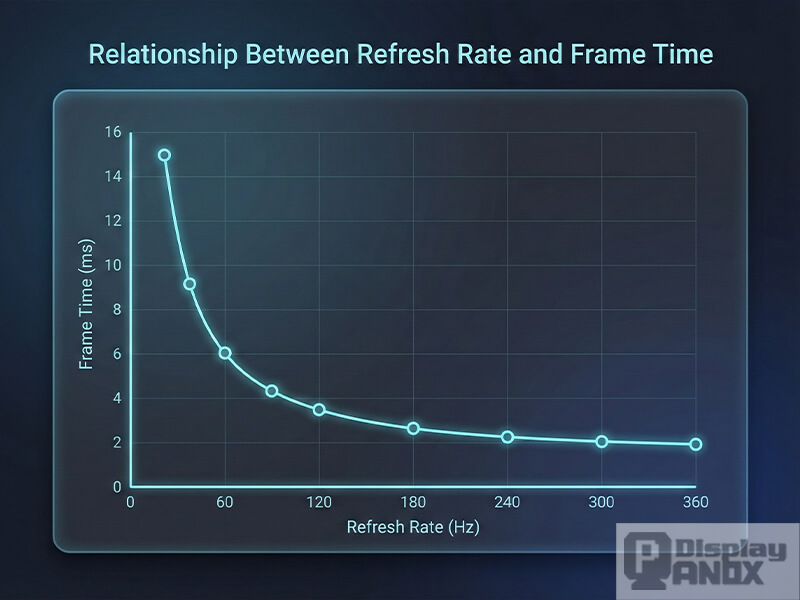
| Refresh Rate | Frame Time | Typical Application |
| 30 Hz | 33.33 ms | Static or low-motion displays; power saving. |
| 60 Hz | 16.67 ms | Standard consumer LCDs; good balance of smoothness/efficiency. |
| 90 Hz | 11.11 ms | High-end smartphones and VR; noticeably smoother. |
| 120 Hz | 8.33 ms | Gaming and automotive; requires fast motion response. |
| 240 Hz | 4.17 ms | Professional gaming; extremely fluid motion. |
Summary
The refresh rate is not just a number on a box; it embodies a complex interaction between optical materials, electronic architecture, and perceptual quality.While 60 Hz remains the standard for general efficiency, applications involving gaming, augmented reality, or high-speed instrumentation benefit significantly from 120 Hz or higher. Conversely, static displays can save power by operating at lower frequencies. Modern display technology continues to evolve with Adaptive Refresh Rates, which dynamically adjust the frequency based on content to achieve the perfect balance between visual stability and power optimization.
If you’re looking for a high-refresh-rate display solution, we offer a full product lineup for your selection.