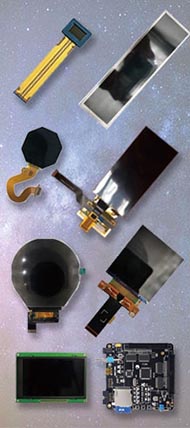





AMOLED displays are loved for their deep blacks, vivid color, high contrast, thin structure, and premium visual feel. But one question keeps coming up from buyers, phone users, and product teams alike: how long does an AMOLED screen last, and should you worry about burn-in? The honest answer is that AMOLED panels do not “suddenly die” after two or three years. What actually happens is gradual aging: brightness slowly drops, color balance can shift over time, and in harsher use cases, static interface elements may leave visible retention or permanent burn-in. Apple, Google, and Samsung all openly acknowledge that OLED/AMOLED displays can show image persistence or burn-in in more extreme long-term conditions, while also using software and panel-care methods to reduce the effect.
For most mainstream users, AMOLED lifespan is strongly shaped by brightness, heat, static content, and usage patterns, not just calendar age. In other words, two phones bought on the same day can age very differently if one spends years showing static navigation bars, always-on widgets, and high-brightness outdoor use, while the other runs mixed content with auto brightness and shorter screen-on time. That is why the better question is not “How many years will AMOLED last?” but “How fast will this specific AMOLED age under this specific usage pattern?”
1. What “AMOLED lifespan” actually means
When people search for AMOLED screen lifespan, they often mix together three different things: normal brightness aging, temporary image retention, and permanent burn-in. These are related, but they are not identical. Apple explains that OLED displays can show temporary image persistence that disappears after normal use, while true burn-in is a more extreme long-term result of repeatedly displaying the same high-contrast content for prolonged periods, especially at high brightness. RTINGS’ long-term OLED testing also found that some effects initially thought to be permanent were actually temporary image retention, while real permanent uneven wear becomes more visible under repeated static-content stress.
So, in practical terms, AMOLED display life usually means how long the panel can maintain acceptable brightness, color uniformity, and clean image quality before aging becomes noticeable enough to bother the user. For many phones, that point may come after the device has already passed its typical replacement cycle. But for heavy users, gaming phones, retail displays, navigation-heavy dashboards, or productivity screens with fixed UI zones, the wear can show up earlier. RTINGS’ accelerated OLED tests are intentionally much harsher than normal mixed use, which is exactly why they are useful: they show that static content is the real enemy, not AMOLED itself.
2. Why AMOLED screens age over time
AMOLED uses self-emissive organic materials, so each pixel produces its own light rather than relying on a separate backlight. That is what gives AMOLED its famous black levels and contrast, but it also means the light-emitting materials gradually degrade with use. The challenge is not equal aging across the whole screen. The real issue is uneven aging. If one area of the display repeatedly shows the same bright shape, that region can wear faster than the rest of the panel and become visible as ghosting or burn-in.
Brightness and heat accelerate that process. Google specifically advises users to keep the default or lower brightness setting, use short sleep timers, and avoid leaving the phone in the sun, because heat and long screen-on exposure increase stress on the display. Apple likewise notes that prolonged display of the same high-contrast image at high brightness is the kind of condition most associated with burn-in.
For portable devices, Low consumption is an important advantage when balancing display quality and battery life.
3. Why blue pixels usually age the fastest
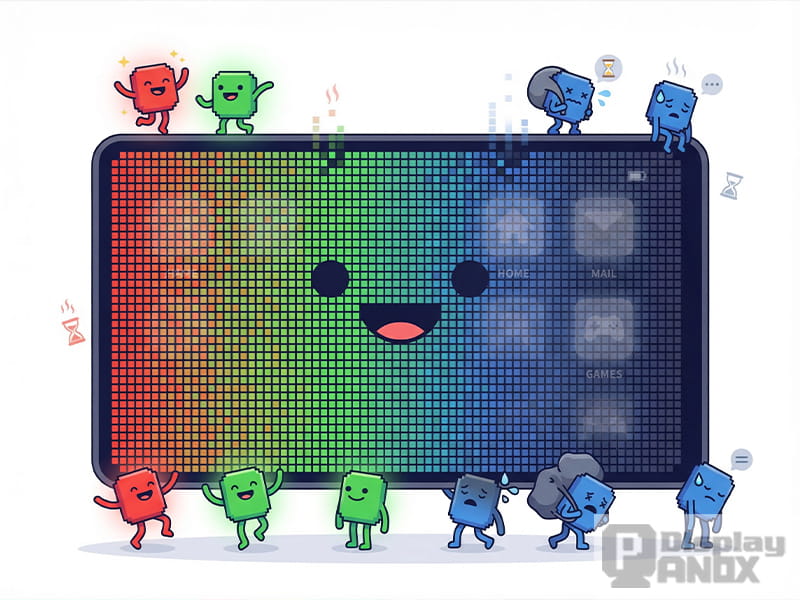
One of the most important technical realities behind OLED lifespan is that blue emitters have historically been the hardest to stabilize. Recent reviews and research papers continue to describe blue OLED stability as a major industry bottleneck. A 2023 Nature Communications paper noted that the lifetime of blue phosphorescent OLEDs can be roughly 10 to 40 times shorter than red and green phosphorescent OLEDs, and broader review literature also highlights shorter blue-emitter operational life as a core challenge for full-color OLED displays.
That does not mean your screen will suddenly turn blue or fail overnight. What it means is that display makers must work around the fact that blue subpixels are under more stress, which is one reason long-term OLED aging may show up as brightness loss, white-point drift, or color imbalance if compensation is not managed well. In consumer language, the simplest way to explain it is this: red and green usually age better, blue is the most fragile part of the trio, and that is a big reason AMOLED longevity is still a major engineering topic in 2026.
Before moving into real-world lifespan estimates, it is also important to understand how AMOLED longevity is evaluated. In practice, display aging is not judged by color theory alone. It is usually discussed through measurable factors such as brightness decline, color shift, uneven wear, and burn-in behavior under controlled or accelerated testing conditions. That testing perspective helps explain why AMOLED lifespan discussions often look different in lab results and in everyday consumer use.
4. How long do AMOLED screens last in real life?
There is no single official “AMOLED lasts X years” standard that applies to every phone, tablet, watch, or custom display module. Real-world longevity depends on panel generation, material stack, brightness profile, thermal design, compensation algorithms, and user behavior. That said, the most realistic consumer answer is that most modern AMOLED phone panels can stay visually acceptable for years under normal mixed use, and severe burn-in is much more likely in edge cases such as fixed navigation bars, static dashboards, retail demo loops, always-open productivity apps, or extremely long high-brightness usage.
RTINGS’ accelerated tests provide a helpful reality check here. Their OLED test beds accumulated more than 10,000 hours of usage in harsh, repeatable conditions, and while burn-in absolutely can happen under static-content torture, the same body of testing also supports the idea that varied content is much less problematic than people fear. That does not prove every smartphone is immune, but it strongly suggests that the average user watching varied content, scrolling apps, and replacing the phone within a typical ownership cycle is less likely to experience catastrophic AMOLED wear than internet horror stories imply.
Many buyers still ask how long does AMOLED last before noticeable brightness loss or burn-in becomes a real concern.
5. AMOLED burn-in vs image retention: what is the difference?
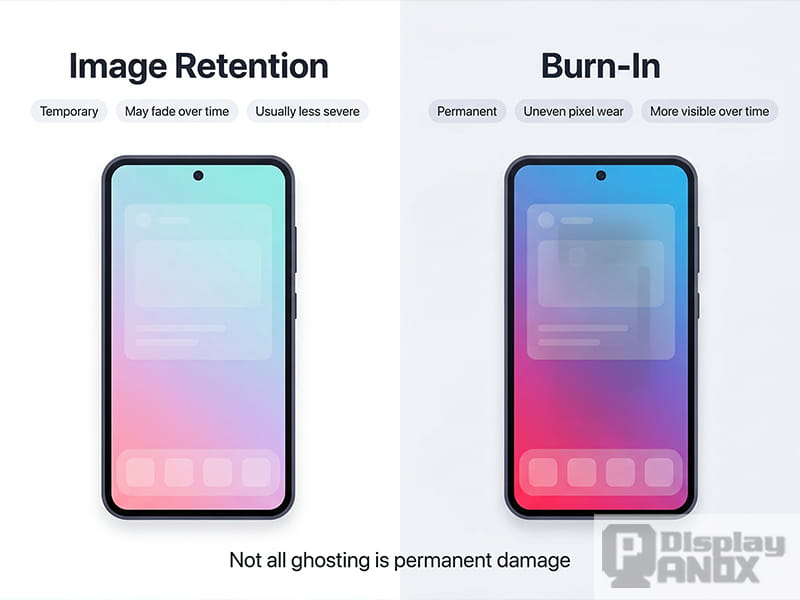
This is one of the most searched questions around OLED screen lifespan. Temporary image retention is a faint afterimage that disappears after a while. Burn-in is persistent and results from uneven long-term pixel wear. Apple explicitly distinguishes temporary image persistence from more extreme burn-in scenarios, and RTINGS also found that some lingering artifacts can be temporary rather than permanent.
Why does this distinction matter? Because users often panic the moment they notice a faint keyboard shadow or status bar trace on a gray background. In some cases, that may fade. In other cases, especially after months or years of static, high-brightness exposure, it may be permanent. So the correct takeaway is not “every ghost image is burn-in,” but also not “all retention will disappear.” Both outcomes are possible, and the difference is usually time, repetition, and stress level.
6. Does Always-On Display reduce AMOLED lifespan?
Always-On Display and AMOLED lifespan is another high-interest topic, especially for flagship phone buyers. The balanced answer is yes, AOD does add some display usage, but modern phones also use multiple protections to reduce the risk. Google’s support community notes that Pixel’s always-on display lowers refresh rate and brightness and slightly moves the text position to minimize burn-in risk, while Apple states that its Always-On display does not remain active in every situation and automatically turns off under conditions such as Low Power Mode, Sleep Focus, or when the phone is face down.
That means AOD is not “free,” but it is also not the same thing as pinning a bright static image at full luminance 24 hours a day. On modern premium devices, AOD is usually heavily dimmed and behavior-managed. The real risk rises when Always-On elements combine with bright widgets, long idle display time, heat, and the same repeated layout over very long periods.
Results from an OLED burn-in test can help illustrate how static content affects panel aging over time.
7. How brands reduce AMOLED aging today
Modern AMOLED products are much smarter than early OLED devices. Apple says its OLED displays use special algorithms that monitor individual pixel usage and automatically adjust pixel brightness to reduce burn-in effects and maintain a more consistent viewing experience. Samsung’s OLED TVs and monitors use panel-care features such as Pixel Shift and logo brightness adjustment, while Google recommends timeout, brightness, and heat-control measures on Pixel devices.
This is why AMOLED lifespan in 2026 is not just a materials story; it is also a software story. Compensation algorithms, pixel refresh behavior, UI dimming, adaptive refresh rate, thermal control, and panel-care logic all help reduce visible wear. The panel still ages, because physics does not negotiate, but good system design can slow uneven aging enough that many users never notice a serious problem during the useful life of the device.
If your application requires smoother animations and more responsive visuals, High refresh rate is a feature worth considering.
8. AMOLED vs LCD lifespan: which lasts longer?
If you search AMOLED vs LCD lifespan, you will often see oversimplified claims saying LCD lasts longer and AMOLED looks better. Reality is more nuanced. OLED/AMOLED pixels are individually emissive and can suffer uneven wear and burn-in. LCD does not have OLED-style burn-in in the same way, but LCDs have their own weaknesses, including backlight degradation, uniformity issues, and other component failures over time. RTINGS’ multi-year reliability work is especially interesting because it found that OLED TVs, especially WOLED and QD-OLED models, actually had relatively few outright failures compared with many LCD sets in the test, even though OLED burn-in remained a specific risk under extreme static-content conditions.
So if the question is “Which technology is more likely to suffer static-image burn-in?” the answer is AMOLED. If the question is “Which one always lasts longer overall?” that is too simplistic. AMOLED and LCD fail differently, age differently, and suit different products differently. For smartphones and premium portable devices, AMOLED is still widely chosen because its contrast, thickness, flexibility, and visual quality are worth the tradeoff.
9. How to extend AMOLED screen life
If you want to make an AMOLED display last longer, the best strategy is not magic software or “burn-in fixer” apps. Google explicitly advises against apps that claim to reduce burn-in. The effective habits are much more boring, and much more useful: keep brightness moderate, reduce long idle-on time, avoid heat, use auto sleep, and do not leave the same high-contrast UI frozen on screen for hours every day.
The most practical habits are these:
-
Use auto brightness or keep brightness lower when possible.
-
Set a short screen timeout so static content is not left on for long periods.
-
Avoid prolonged maximum brightness outdoors when it is not necessary.
-
Reduce static UI exposure where possible, especially fixed widgets, navigation bars, and full-screen paused images.
-
Let built-in panel-care features such as pixel shift or compensation functions stay enabled.
These tips will not stop aging completely, but they can meaningfully slow differential wear, which is the part users actually notice.
Discussions about AMOLED lifespan years are most meaningful when they also consider panel materials, software protection, and real-world usage patterns.
10. Should you worry about AMOLED lifespan before buying?
For most users, no, not excessively. AMOLED still offers one of the best viewing experiences available in phones, wearables, automotive interfaces, and many premium custom devices. The technology does have finite organic aging, and yes, burn-in is real. But the internet often makes it sound like every AMOLED panel is a ticking time bomb, which is not supported by how modern devices are engineered or how mixed-content users actually behave. Apple, Google, and Samsung all acknowledge the risk while also implementing mitigation at the device level, which tells you the real story: the problem exists, but it is managed, not ignored.
The smarter buying decision is to match the display to the application. If your product or daily routine involves lots of moving visuals, varied content, premium image quality, and compact industrial design, AMOLED remains an excellent choice. If the use case is a fixed industrial dashboard with static icons displayed all day at high brightness, lifespan planning needs to be more careful. AMOLED is brilliant, but like any premium material, it rewards good use and punishes abuse.
If you want to explore real AMOLED solutions beyond the general comparison, you can also check our product range for different sizes and applications.
FAQs
1. How many years does an AMOLED screen last?
There is no single number for every device, but modern AMOLED screens can remain visually good for years under normal mixed use. Lifespan depends heavily on brightness, heat, static content, and panel-care software rather than age alone.
2. Do AMOLED screens always get burn-in?
No. Burn-in is possible, but it is not inevitable. The biggest risk comes from long-term display of the same bright, high-contrast elements in the same location. Mixed content is much less risky than static-content torture scenarios.
3. Why do blue pixels wear out faster on OLED and AMOLED?
Blue OLED materials have historically been less stable than red and green, and research continues to describe blue-emitter lifetime as one of the major OLED engineering challenges.
4. Is image retention the same as burn-in?
No. Image retention can be temporary and fade away, while burn-in is persistent uneven wear caused by longer-term repeated stress.
5. Does Always-On Display damage AMOLED screens?
Always-On Display adds usage, but modern phones usually lower brightness, reduce refresh rate, and use protective logic to reduce risk. It is generally less concerning than leaving a bright static image on screen for long periods.
6. What is the best way to prevent AMOLED burn-in?
Use moderate brightness, shorter screen timeout, less static content, less heat exposure, and keep built-in panel-care features enabled. Google and Samsung both recommend these kinds of protections.
7. Is AMOLED lifespan worse than LCD lifespan?
AMOLED is more vulnerable to static-image burn-in, but LCD has different aging and reliability issues of its own. One is not automatically better in every lifespan scenario; the result depends on the product and use case.
8. Is AMOLED still worth buying in 2026?
Yes. AMOLED remains one of the best display technologies for premium consumer electronics because of its contrast, color performance, thin structure, and design flexibility. Buyers just need a realistic understanding of how display aging works.
Learn more:What Buyers Should Evaluate in a Flexible AMOLED Project